Price Matchers
Daily Amazon Price Guessing Game
May 2026
I’ve been building a little daily game called Price Matchers. Inspired by Price is Right, I figured I could bring a price guessing game to the world using real Amazon products.
Here’s how it came together.
The Goals
I’ve built games, including daily games (see OhWord!?), before. I also enjoy playing daily games quite a bit (my favorites are __, __, and __). Something that these games all have that OhWord!? does not have is a true finished state.
The games I enjoy most are puzzles meant to be solved. You answer a question and are either right or wrong and maybe you are judged for how right or wrong. In OhWord!? you are given a task meant to be completed, but it’s never done. User’s are never wrong or rewarded for obscure knowledge or quick thinking. It’s part of the reason that I don’t even play OhWord!? that often myself.
I wanted to make a new game, with set puzzles (like how the NYT Crossword is curated), that had a true end state.
Main goal: create a fun daily game with a solveable puzzle
I also wanted to see if I could generate some profit from it. With the game idea already being very product oriented, I felt there were a few opportunities to generate revenue:
- Use Amazon affiliate links
- Allow advertisers to list their products on the site
- Google AdSense (which I’ve already setup for this domain)
With these goals, I started building (it’s 2026, so I really mean vibe coding).
The Stack
Nothing exotic here, mostly chosen for zero cost and ease of use:
- Next.js 15 (App Router) on Vercel free tier
- Neon Postgres (serverless, free tier) via Drizzle ORM (as per Claude’s recommendation)
- No user accounts — scores live in
localStorage - No auth library — admin is protected by a single password in middleware
This was the first project that I asked Claude to start from scratch, so it was interesting to see what choice’s it defaults to. I noticed that Claude likes Tailwind a lot. I cannot stand Tailwind, so I had to ask for a refactor.
Claude also recommended Neon and Drizzle, which I think is the right call for a project this size. It’s typed, lightweight, and its migration system is simple enough to reason about without a runbook. The schema is around five tables: puzzles, puzzle_slots, products, game_plays, and some ancillary stuff. Drizzle configs also allow Claude to see all the db change history, which is great because I ask Claude to make all these changes anyway.
The Gameplay and Name
The premise is simple: show someone an Amazon product, maybe they have something similar or maybe they’ve never heard of it, then ask them to guess the price. I called it “DealBusterz” (with the A->Z being an homage to Amazon’s logo).
The format was:
- “Price Is Right” rules: guess as close as you can get without going over, if you’re over: you’re “Busted!”
- 3 products per puzzle, each gives you 15 seconds to make a guess
- only 1 guess per product
With a basic game created, it was time for some user feedback. I found that the game was too unforgiving. The game played too quickly, with the timer rushing you and only 1 guess. But the biggest thing was that the game didn’t let you feel smart. After 1 guess, you were told close, far or busted. No knowledge is gained and then used.
I also felt that advertisers wouldn’t like this for a few reasons:
- products would be shown for only 15 seconds at most
- players a punished for guessing too high, wouldn’t they prefer people be pleasantly surprised by a good deal?
So I changed it up:
- 3 guesses per product. After the first, you get a proximity hint (“very close!” / “way off!”). After the second, you learn whether you moved in the right direction. Score is based on accuracy across all three products.
- No timer, take as long as you want
- No concept of busting, at the end you’re either “Short” or “Overpaid”
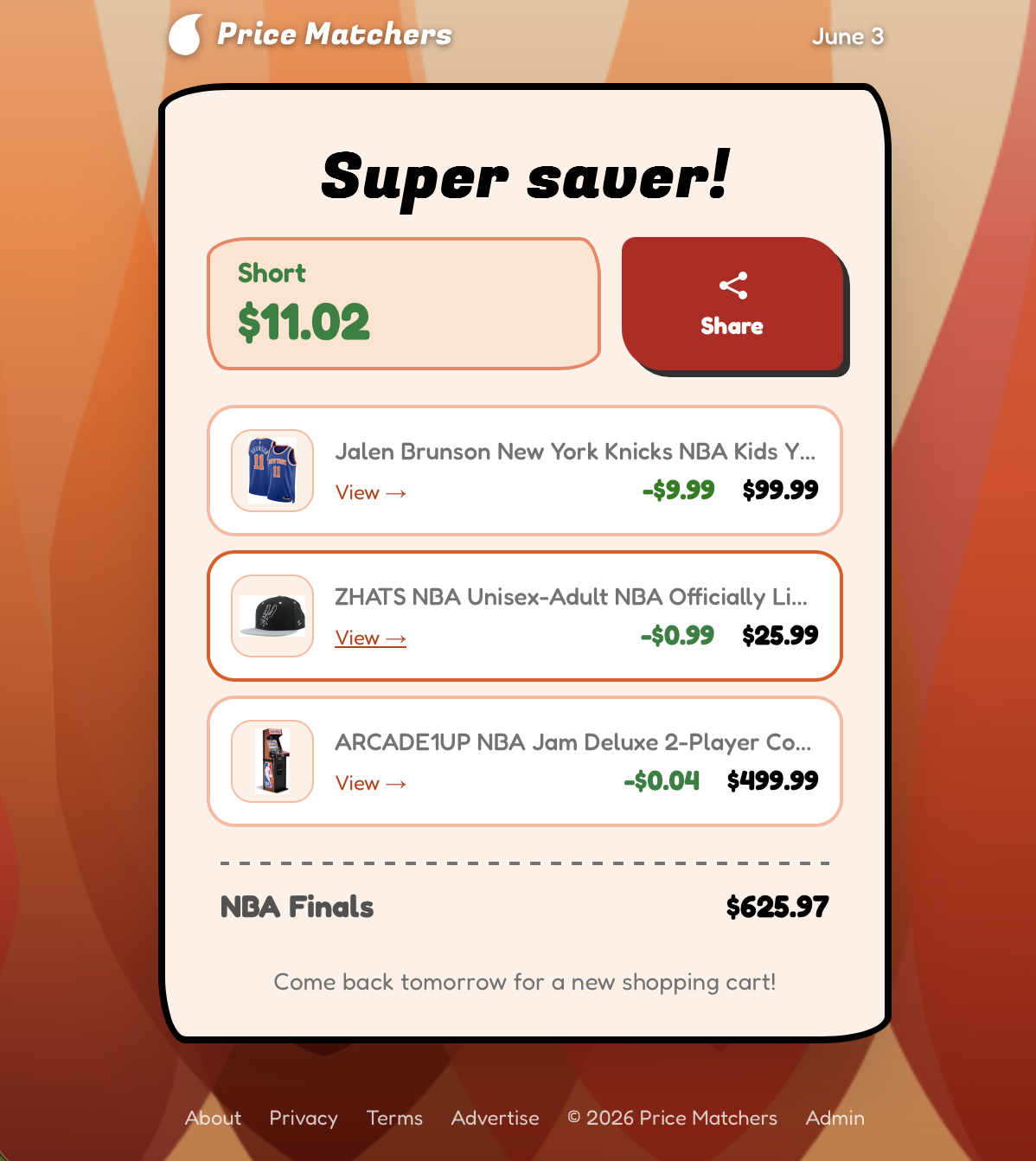
This game was more fun, as you have time to correct your mistakes. There’s a feeling of discovery. And there’s a total score which sometimes works out to be better than each individual score.
With a new core mechanic, we needed a new name. I went with PriceMatcher$, because now the game is about matching price. I went with a fire theme.
🔥 Price Matchers — June 2

🔴🔴🟡⬇️
🟠🟡🟢⬇️
🟢🟢⬇️

$32.98 SHORT 💳🟡

https://pricematchers.flanny.app
The Admin Panel
And now for the behind the scenes part. Out of the gate I knew I would have to have a UI to add puzzles to. What I didn’t realize was how modular I would need things to be (I’ll talk about this in a sec).
The admin panel has:
- A dashboard showing today’s completions, the next schedule gap, a site version number, and a button to clear local storage so I can play again
- A calendar with drag-and-drop to move puzzles between dates
- A puzzle editor where you paste an Amazon link, click Fetch, and the app scrapes the product page for title, image, and live price
- A products table with filtering by status (unused / in-puzzle / played) and affiliate link presence
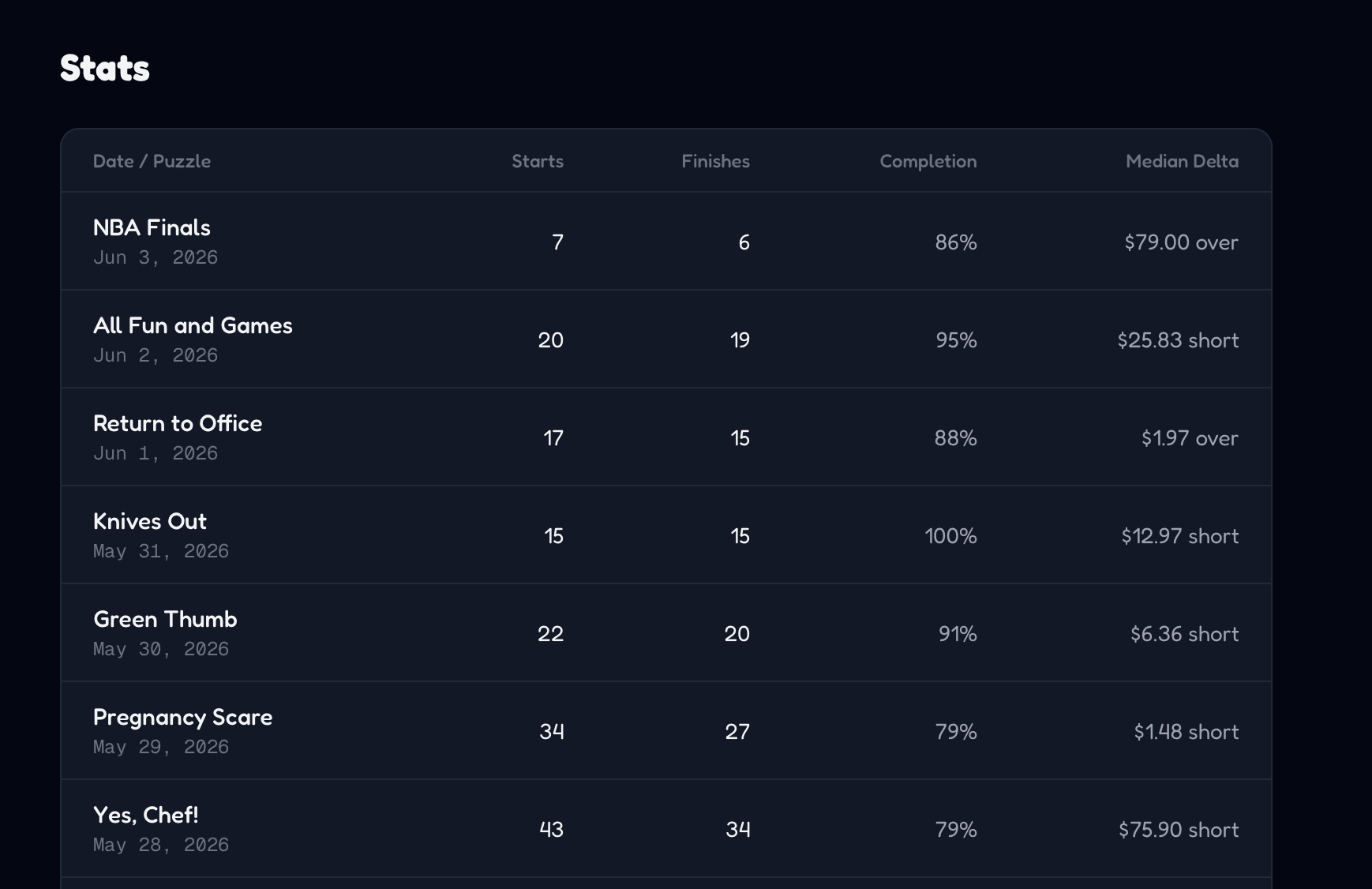
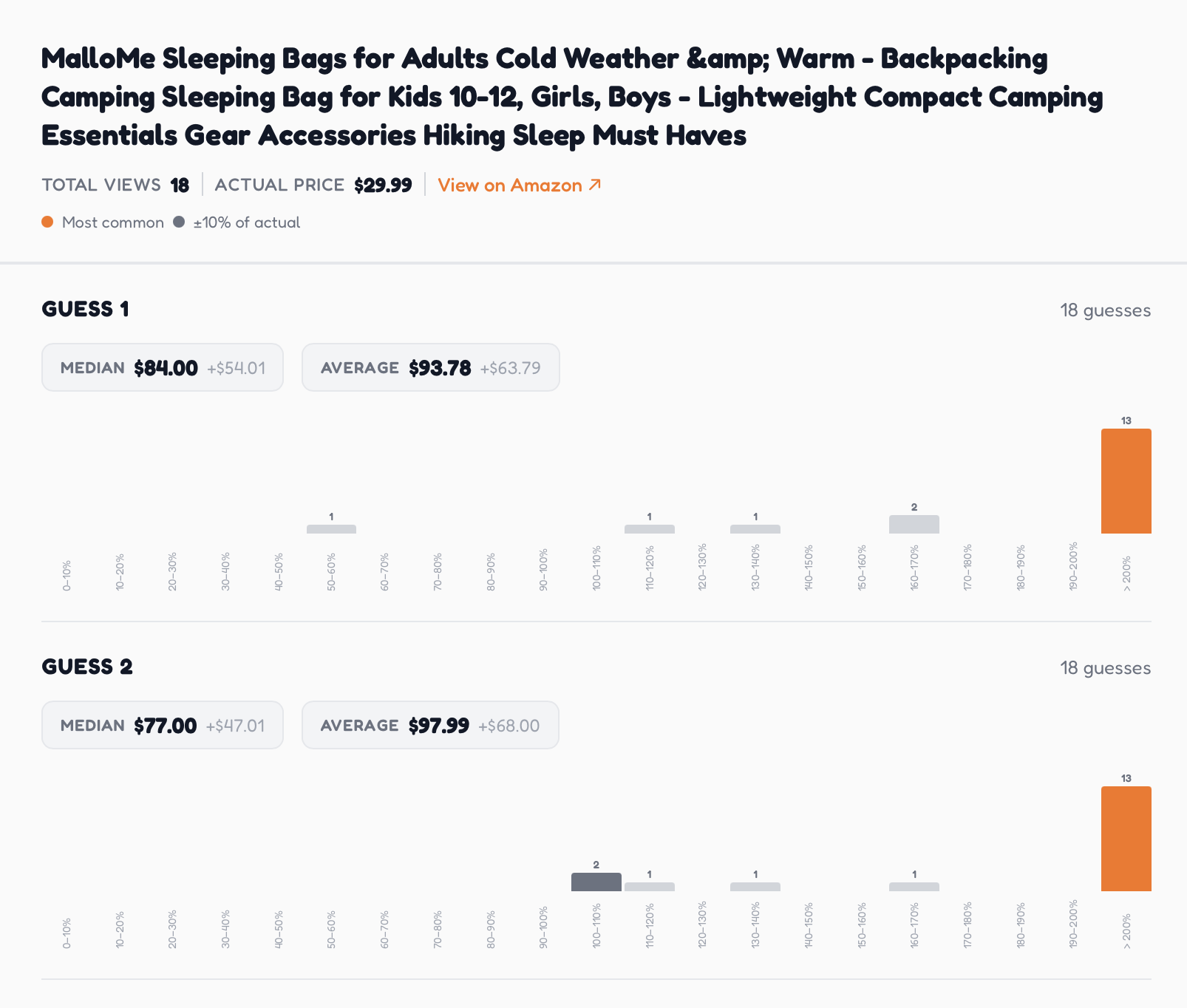
- A stats page with histograms of guess distributions, median delta, and per-product breakdowns
Drag and drop became my best friend here. I realized I needed way to move products between puzzles and puzzles between days. This allows me to quickly change the schedule and modify puzzles at a high level.
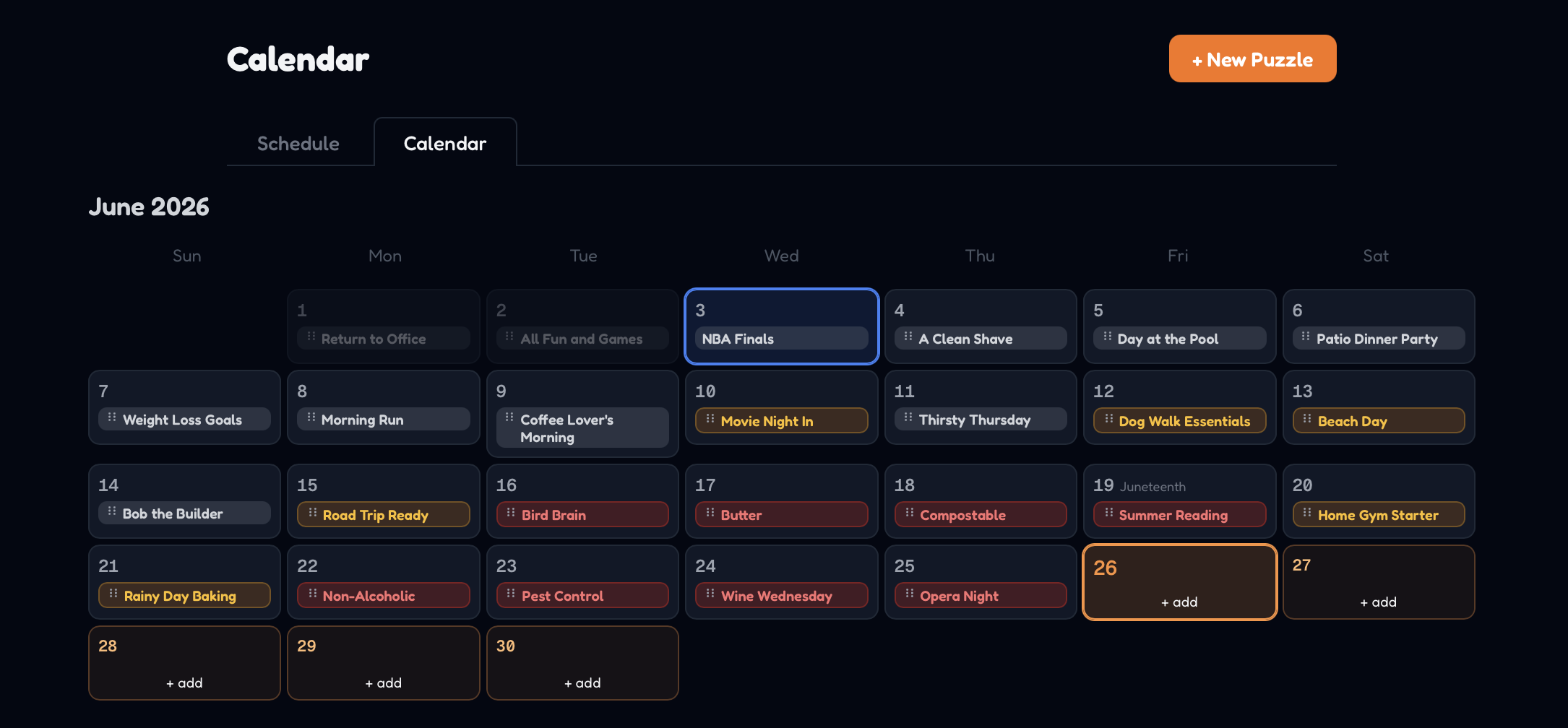
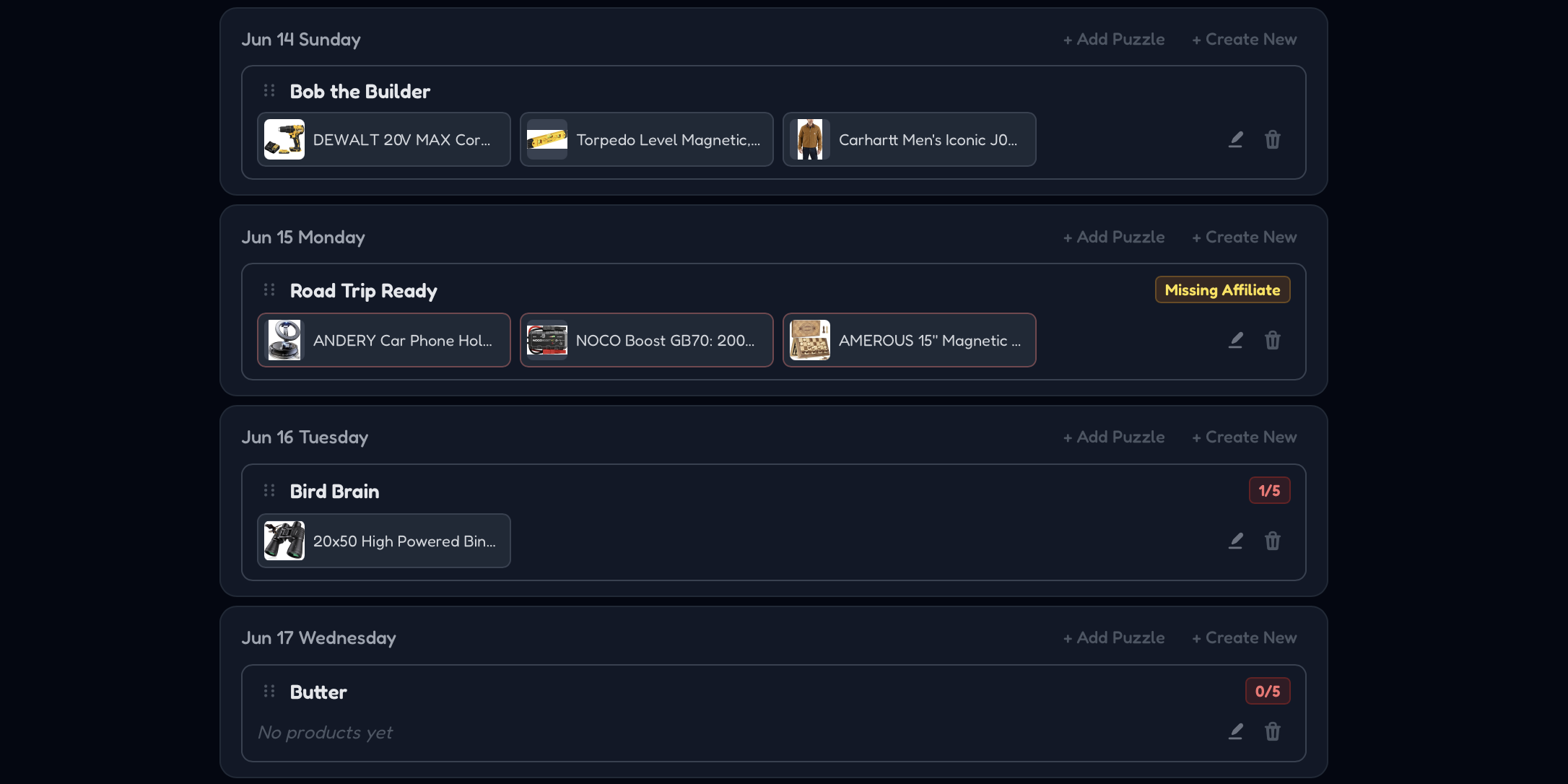
I also didn’t have the puzzle list page initially. I started with a list of all products that I can add to. But when I realized puzzles should be themed, it became less important to see products themselves and more important to see the whole backlog of puzzles. So I added that page too.
This is all a lesson in realizing the value of versatility. Before, we had restrictions:
- Puzzles must have a certain number of products
- Puzzles must have dates attached
- Only one puzzle per date
While these restrictions are helpful to make sure things works, they also make it very difficult to work on the puzzle schedule. No more going to write a puzzle you only have an idea for, but being forced to create a whole puzzle. Puzzles you don’t want to play don’t have to be deleted or rescheduled, they can no be unscheduled.
I also made sure I had access to stats.
Using AI to Generate Puzzle Content
Now for OhWord!? I auto generated puzzles randomly, like spilling tiles out of a Scrabble bag, and that was enough. But for this, a little more has to go into each. Puzzles need a theme and three different products. Puzzles themes should be relevant to the season and coming holidays. Products should be unique and reasonably priced. Since more thought has to go into these puzzles, I figured I should have AI make a backlog of them.
I came up with 3 ways to do this curation.
- Go one day at a time, approve AI’s theme, then approve 3 different products
- Have AI backfill a bunch of unscheduled puzzles for me to schedule manually
- Suggest a title and 3 products, AI only does the product search and DB entry.
I found that the first one has enough manual input that I might as well make the puzzles myself. I’m very fond of 2 and 3. With 2 I’m just adding content that I can choose to use or not. With 3, I’m making a puzzle and just not going through the tedious work of data entry.
Monetization Plan
And of course, I would love for this game to turn a little profit. I have Amazon Affiliate links on all the products, but I could be doing more.
Here’s what a sponsored puzzle slot can get an advertiser:
- Product shown to all players that day
- Data about player guesses for cost estimates.
The second thing is arguably more valuable. If players are guessing low, maybe you need to improve your product images. If players are guessing high, maybe you could charge a little more.
I put up a page for Advertisers to find out more, and eventually buy ad slots.